
The full-stackPDF library
brevier is written in Python. It makes PDFs from the plainest web tools: HTML, CSS, JSON and Handlebars. Or write the template in Markdown, which AI agents read and write with ease.
pip install brevierrechnung/rechnung.html
<!DOCTYPE html>
<html lang="de">
<head><meta charset="utf-8"><title>Rechnung {{ rechnung.nummer }}</title></head>
<body>
  <p class="absender">{{ firma.name }}, {{ firma.anschrift }}</p>
  <address>{{ kunde.name }}<br>{{ kunde.strasse }}<br>{{ kunde.ort }}</address>

  <h1>Beitragsrechnung {{ rechnung.nummer }}</h1>
  <p>Datum: {{ rechnung.datum | date }}</p>

  <table>
    <thead>
      <tr><th>Pos.</th><th>Leistung</th><th>Betrag</th></tr>
    </thead>
    <tbody>
      {{#each rechnung.positionen}}
      <tr><td>{{ pos }}</td><td>{{ text }}</td><td>{{ betrag | money }}</td></tr>
      {{/each}}
    </tbody>
  </table>
  <p class="summe">Summe {{ rechnung.summe | money }}</p>
</body>
</html>
rechnung/rechnung.css
@page {
  size: A4;
  margin: 25mm 20mm 25mm 25mm;
  @bottom-right {
    content: "Seite " counter(page) " von " counter(pages);
    font: 8pt sans-serif;
  }
}
body { font: 10pt/1.4 sans-serif; color: #16181c; }
.absender { font-size: 7pt; border-bottom: 0.5pt solid #16181c; }
address { font-style: normal; margin: 2mm 0 20mm; }
h1 { font-size: 14pt; }
table { width: 100%; border-collapse: collapse; }
th { text-align: left; border-bottom: 1pt solid #16181c; }
td { padding: 1.5mm 0; border-bottom: 0.5pt solid #d5d9df; }
td:first-child { width: 14mm; }
td:nth-child(2) { width: 34mm; }
td:last-child, th:last-child { text-align: right; }
.summe { text-align: right; font-weight: bold; }
rechnung/rechnung.json
{
  "firma": { "name": "Muster Versicherung AG", "anschrift": "Hauptstraße 1, 10115 Berlin" },
  "kunde": { "name": "Erika Mustermann", "strasse": "Beispielweg 7", "ort": "50667 Köln" },
  "rechnung": {
    "nummer": "R-2026-0142",
    "datum": "2026-09-25",
    "positionen": [
      { "pos": 1, "text": "Berufsunfähigkeitsversicherung", "betrag": 84.2 },
      { "pos": 2, "text": "Haftpflichtversicherung", "betrag": 7.9 },
      { "pos": 3, "text": "Hausratversicherung", "betrag": 12.4 }
    ],
    "summe": 104.5
  }
}
rechnung/rechnung.schema.json
{
  "$schema": "https://json-schema.org/draft/2020-12/schema",
  "type": "object",
  "properties": {
    "firma": { "$ref": "#/$defs/Firma" },
    "kunde": { "$ref": "#/$defs/Kunde" },
    "rechnung": { "$ref": "#/$defs/Rechnung" }
  },
  "required": ["firma", "kunde", "rechnung"],
  "$defs": {
    "Firma": {
      "type": "object",
      "properties": {
        "name": { "type": "string" },
        "anschrift": { "type": "string" }
      },
      "required": ["name", "anschrift"]
    },
    "Kunde": {
      "type": "object",
      "properties": {
        "name": { "type": "string" },
        "strasse": { "type": "string" },
        "ort": { "type": "string" }
      },
      "required": ["name", "strasse", "ort"]
    },
    "Rechnung": {
      "type": "object",
      "properties": {
        "nummer": { "type": "string", "title": "Rechnungsnummer" },
        "datum": { "type": "string", "format": "date", "title": "Rechnungsdatum" },
        "positionen": { "type": "array", "items": { "$ref": "#/$defs/Position" } },
        "summe": { "type": "number", "format": "decimal", "title": "Gesamtbetrag" }
      },
      "required": ["nummer", "datum", "positionen", "summe"]
    },
    "Position": {
      "type": "object",
      "properties": {
        "pos": { "type": "integer" },
        "text": { "type": "string" },
        "betrag": { "type": "number", "format": "decimal" }
      },
      "required": ["pos", "text", "betrag"]
    }
  }
}
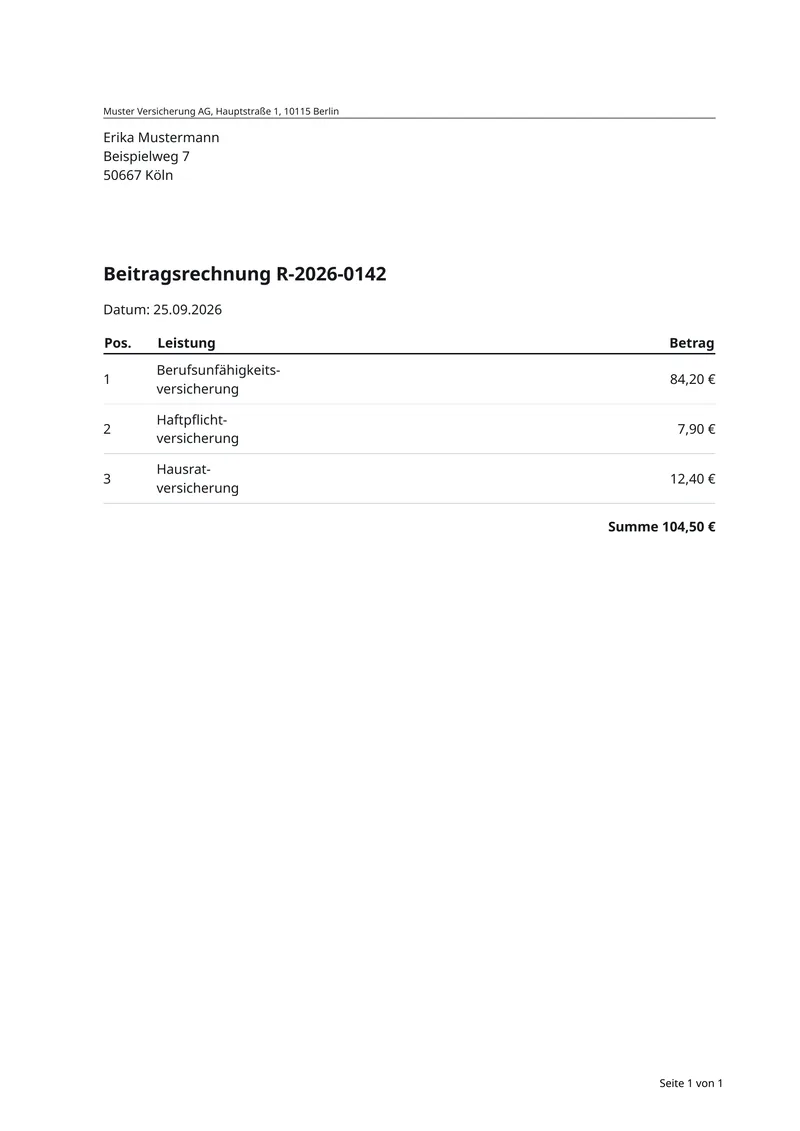
rechnung/rechnung.pdf
rechnung/rechnung.md
---
style: rechnung.css
---

{{ firma.name }}, {{ firma.anschrift }}

An: {{ kunde.name }}, {{ kunde.strasse }}, {{ kunde.ort }}

# Beitragsrechnung {{ rechnung.nummer }}

Datum: {{ rechnung.datum | date }}

| Pos. | Leistung | Betrag |
| --- | --- | ---: |
{{#each rechnung.positionen}}
| {{ pos }} | {{ text }} | {{ betrag | money }} |
{{/each}}

**Summe {{ rechnung.summe | money }}**
rechnung/rechnung.css
@page {
  size: A4;
  margin: 25mm 20mm 25mm 25mm;
  @bottom-right {
    content: "Seite " counter(page) " von " counter(pages);
    font: 8pt sans-serif;
  }
}
body { font: 10pt/1.4 sans-serif; color: #16181c; }
.absender { font-size: 7pt; border-bottom: 0.5pt solid #16181c; }
address { font-style: normal; margin: 2mm 0 20mm; }
h1 { font-size: 14pt; }
table { width: 100%; border-collapse: collapse; }
th { text-align: left; border-bottom: 1pt solid #16181c; }
td { padding: 1.5mm 0; border-bottom: 0.5pt solid #d5d9df; }
td:first-child { width: 14mm; }
td:nth-child(2) { width: 34mm; }
td:last-child, th:last-child { text-align: right; }
.summe { text-align: right; font-weight: bold; }
rechnung/rechnung.json
{
  "firma": { "name": "Muster Versicherung AG", "anschrift": "Hauptstraße 1, 10115 Berlin" },
  "kunde": { "name": "Erika Mustermann", "strasse": "Beispielweg 7", "ort": "50667 Köln" },
  "rechnung": {
    "nummer": "R-2026-0142",
    "datum": "2026-09-25",
    "positionen": [
      { "pos": 1, "text": "Berufsunfähigkeitsversicherung", "betrag": 84.2 },
      { "pos": 2, "text": "Haftpflichtversicherung", "betrag": 7.9 },
      { "pos": 3, "text": "Hausratversicherung", "betrag": 12.4 }
    ],
    "summe": 104.5
  }
}src/main/java/RechnungService.java
import com.brevier.Brevier;

public class RechnungService {

    public byte[] pdf(Firma firma, Rechnung rechnung, Kunde kunde) {
        return Brevier.template("rechnung")
                      .render(firma, rechnung, kunde);
    }
}app/rechnung.py
import brevier


def pdf(firma, rechnung, kunde) -> bytes:
    return brevier.template("rechnung").render(firma, rechnung, kunde)
Everything a business document needs
brevier handles the print rules, so you can focus on your data.
HTML and CSS templates
The page is HTML with CSS. No proprietary format, no drawing code.
Markdown for simple documents
Write a letter in Markdown with front matter. brevier eject turns it into the HTML it compiles to.
Data binding
Handlebars syntax binds JSON into the template: values, loops and conditions.
Templates checked against a schema
A misspelt field fails the check before anything prints.
from-code: start from your classes
Reads Java classes or Python models and writes a schema, a template and sample data.
The visible middle
--emit-html writes the exact HTML the engine received, and --format html renders a web view of the same document.
German and English hyphenation
Compound words break at their joins: Berufsunfähigkeits-versicherung, not Beruf-sunfähigkeit. Companies can add their own words.
Tables that span pages
Declared column widths and a header row that repeats on every page.
Übertrag
The running total is carried to the bottom of each page and to the top of the next.
Headers, footers and page counters
Seite 3 von 12, in one editable block, on every page.
Contracts and fine print
Numbered clauses, a table of contents with page numbers, and small print that stays readable. No heading is left alone at the bottom of a page.
Every feature, with its status
Open the feature list
Brevier is German for a prayer book: the small book you keep close and use every day. That is what brevier wants to be for developers who must write code that makes PDFs. I had to do that job myself, with tools that made it hard. So I built brevier to make PDF generation easy for developers.
Built on what you already know
HTML, CSS, JSON and your own code. Nothing new to learn.
HTML for the page
The template is an HTML page. Handlebars fills it with your data: values, loops and conditions.
developer.mozilla.orgCSS for the look
CSS sets the fonts and colours, and the printed page too: size, margins, headers, footers and page numbers.
CSS @pageJSON for the data
Your data comes in as JSON. A JSON Schema checks every field before anything prints.
json-schema.orgYour own code
Send the objects you already have from Java, Python and other languages. brevier turns them into the data.
See the clients
Install anywhere
Install brevier with pip, a one-line script or Docker. It runs on Linux, macOS and Windows.
Call it from your languageFor Python 3 users. pip needs the Pango library on your system.
- Install brevier
pip install brevier - Check that it works
brevier --version - Render the example from the top of this page
brevier render rechnung.html --data rechnung.json -o rechnung.pdf
The script installs brevier in its own folder and puts the brevier command in ~/.local/bin. On macOS it also installs Pango.
- Install brevier
curl -fsSL https://get.brevier.dev | sh - Check that it works
brevier --version - Render the example from the top of this page
brevier render rechnung.html --data rechnung.json -o rechnung.pdf
The PowerShell script installs Pango through MSYS2, then installs brevier for your user and adds it to your PATH.
- Install brevier
iwr -useb https://get.brevier.dev/ps1 | iex - Check that it works
brevier --version - Render the example from the top of this page
brevier render rechnung.html --data rechnung.json -o rechnung.pdf
Nothing to install on the machine but Docker. The image runs brevier in the folder you mount at /work.
- Install brevier
docker pull brevier/brevier:latest - Check that it works
docker run --rm brevier/brevier --version - Render the example from the top of this page
docker run --rm -v "$PWD:/work" brevier/brevier render rechnung.html --data rechnung.json -o rechnung.pdf